How To Build A Shopify Store With AI (Step-By-Step Guide For 2026)
In 2026, anyone can build a Shopify store without writing a single line of code. The combination of Shopify’s intuitive platform and modern ai store builder tools has eliminated the technical barriers that once made e-commerce feel intimidating. This guide answers the question “how do I build a Shopify store today?” with practical steps you can complete in a single afternoon.
You can go from a blank idea to a fully ready to sell online store in under an hour by combining Shopify with an ai store builder like Debutify’s AI Store Builder. AI store builders automate the creation of online stores by generating product pages, descriptions, images, and layouts from minimal input, significantly reducing the time and effort required to set up a store. Here’s what this guide covers:
- Manual setup steps alongside how an ai built store automates theme configuration, product pages, and copywriting
- How to start selling or start dropshipping within hours instead of weeks
- Which ai shopify store builder free options deliver real value versus hidden costs
- Conversion optimization strategies that separate profitable stores from abandoned projects
- Why Debutify’s ai store builder for shopify stands out for merchants focused on revenue, not just aesthetics
Step 1: Plan Your Niche, Audience, and Store Structure
Skipping the planning phase is the most expensive mistake new merchants make. Building a successful Shopify store from scratch requires a systematic approach that balances technical setup with strategic market research and customer engagement. Validating your business idea before starting ensures there is genuine demand for what you’re selling.
Identifying a profitable niche involves focusing on underserved market segments where unique value can be offered. High-potential products typically solve a specific problem, trigger impulse purchases, or cater to passionate hobbyists. In 2026, promising niches include:
- Pet anxiety products – search volume spiked 180% following the post-2024 pet wellness boom
- Home office ergonomics – sustained demand with 1.2B TikTok views on related content
- Beginner calisthenics gear – growing fitness segment with 800M+ social views
Using tools like Google Trends helps verify long-term interest in product ideas rather than fleeting fads. Cross-reference with TikTok’s Creative Center to spot viral momentum before competitors catch on.
Define your target customer avatar with specifics: age range (25-44), budget ($50-100), location (urban US), and the core problem they need solved. This shapes your product page messaging and brand tone.
Before committing to a niche, consider collecting feedback from potential customers using tools like Fillout. A simple survey can help validate product demand, uncover buying objections, and identify the language customers use when describing their problems—insights that often lead to higher-converting product pages and ad campaigns.
Your initial online store structure should include:
- Home (hero section + featured collections)
- Shop/Collections (filterable product grid)
- Individual product pages (media, benefits, social proof)
- About, Contact, FAQ, Shipping & Returns
Modern tools like storebuilder ai platforms can suggest niches and generate sitemap structures automatically based on a few prompts, cutting planning time from days to minutes.
Step 2: Create Your Shopify Account and Essential Settings
Head to Shopify.com and take advantage of the current starter offer—typically $1/month for the first three months—to build a Shopify store with minimal upfront investment. The typical cost for hosting a Shopify store through an AI store builder can range from $20 to $30 per month afterward, comparable to a standard subscription service like Netflix.
A structured approach to setting up a Shopify store typically includes these initial steps:
- Sign up with your email and choose a store name (niche-specific names like “PetCalmHub” outperform generic options)
- Set your default currency, shipping origin address, and time zone
- Configure these before adding products so your online store functions correctly from day one
Payment setup is mandatory before you can start selling:
- Activate Shopify Payments (2.9% + 30¢ per transaction, available in 175+ countries) or connect PayPal/Stripe
- Activating Shopify Payments or other gateways provides flexible checkout options for customers
- Unconfigured payment settings block checkouts—this causes approximately 15% of support tickets
Shopify’s built-in templates can help generate Privacy, Refund, and Shipping policies easily. Creating essential pages such as About Us, Contact, and FAQ helps build trust with customers. Connect a custom domain ($10-15/year via GoDaddy or Namecheap) to boost credibility—branded URLs increase trust by roughly 35% according to Shopify UX research.

Step 3: Use An AI Store Builder To Build Your Store Faster
An ai store builder differs fundamentally from traditional page builders or Shopify themes. While themes provide static templates you customize manually, AI store builders use large language models to interpret your inputs and generate production-ready code, copy, and layouts automatically.
Tools like Debutify’s AI Store Builder function as an ai online store builder and ai online store generator specifically optimized for Shopify. The best AI store builders not only create basic templates but also generate unique designs and conversion-optimized copy tailored to specific audiences.
The experience follows a wizard-style flow:
- Choose your niche
- The ai store maker generates your homepage.
- Receive an ai store with mobile-optimized layouts and UX best practices built in
AI store builders often provide a allowing users to customize store layouts and designs without needing technical skills. Key benefits versus manual setup include:
- Save dozens of hours on design and writing compelling content
- Automatically avoid beginner UX mistakes that hurt conversions
Whether you search for ai store builder free, ai store builder com, or ai built shopify stores for free, the core value proposition remains: AI tools for Shopify store creation allow users without technical skills to launch professional-looking stores quickly, as these tools handle design and content generation automatically.
Why Highlight Debutify’s AI Store Builder For Shopify
Debutify AI Store Builder is designed for serious merchants focused on revenue—not just demo sites that look pretty but never convert.
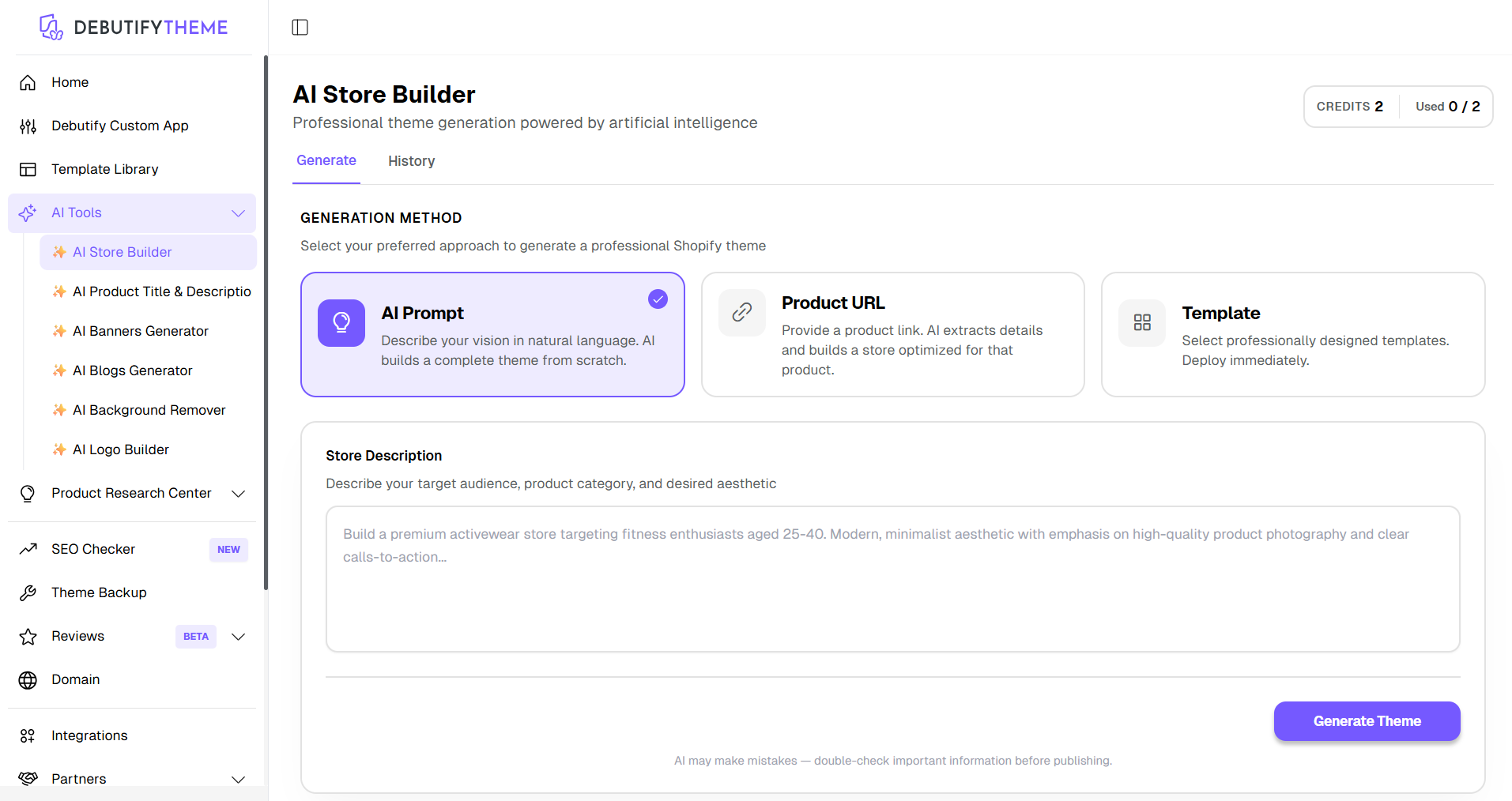
After completing a short onboarding quiz, Debutify automatically generates a fully functional shopify store structure with optimized Home page and on-brand text. Unlike competitors that gate features behind trials, Debutify’s tool behaves like a build your store ai free assistant during setup with generous free usage options.
How Debutify AI store Builder works:
Method 1: AI Prompt (Build from scratch)
- Go to AI Store Builder → Generate tab
- Select AI Prompt
- In the Store Description box:
- Describe your target audience
- Mention your product category
- Define your brand style/aesthetic (e.g., modern, luxury, minimal)
- Include any specific features (e.g., upsells, bundles, testimonials)
- Review your input for clarity
- Click Generate Theme
- Wait for AI to create your store design
Method 2: Product URL (Auto-build from product)
- Go to AI Store Builder → Generate tab
- Select Product URL
- Paste a valid product link (e.g., AliExpress, Shopify product page)
- The AI will automatically:
- Extract product details (images, title, description)
- Generate a store layout optimized for that product
- Click Generate Theme
- Review and customize the generated store if needed
Method 3: Template (Pre-designed layouts)
- Go to AI Store Builder → Generate tab
- Select Template
- Browse available professionally designed templates
- Choose a template that fits your niche
- Click to apply/deploy the template
- Customize content (products, text, branding) as needed
Step 4: Design a High-Converting Theme and Homepage
Design affects trust and conversion more than minor price adjustments. First impressions are 94% design-related, and poor visuals can drop conversions by 40%. For new online store visitors, professional design signals legitimacy before they read a single word.
Choosing a Shopify theme like Debutify Theme (or another conversion-focused option) provides a solid foundation. An ai store builder can auto-configure colors using brand palette matching, typography (2-3 fonts maximum), and hero sections a trending element in 2026.
Debutify’s AI Store Builder goes beyond just setting up your Shopify store; it offers a suite of powerful AI-powered features designed to streamline every aspect of your e-commerce business.
Must-have homepage sections for maximum conversion:
- Clear hero with value proposition (“End Pet Anxiety in 10 Minutes”)
- Featured collection showcasing 4-6 top products
- Benefits icons highlighting 5 key advantages
- Social proof section with testimonials and user-generated content
- Final CTA driving visitors to shop or start selling
Free ai tools or Debutify’s built-in AI can generate brand slogans, banner copy, and call-to-action buttons that feel cohesive.

Optimizing Product Pages With AI
Your Store determine whether visitors become customers. High-converting products can increase sales by over 30% when optimized with proven conversion techniques. This matters especially when you start dropshipping, since products may be similar across competing stores.
Every product page needs these elements:
- Benefit-driven headline that speaks to customer outcomes, not features
- 7+ high-resolution gallery images showing different angles and contexts
- Concise bullet benefits (benefits convert 3x better than feature lists)
- Guarantees (30-day money-back) and FAQ accordion addressing objections
- Urgency or scarcity signals where appropriate
Using urgency and scarcity tactics, such as countdown timers or limited stock notifications, can significantly boost conversion rates by creating a sense of urgency among shoppers. Optimized product descriptions that focus on benefits rather than features resonate more with potential buyers’ needs and desires.
AI can also localize titles and descriptions for different markets, improving SEO and conversion for global traffic to your online store. Using relevant keywords in product titles and descriptions can improve search visibility, while optimizing product images and page meta descriptions helps search engines index the Shopify site easily.
Step 5: Add Products and Set Up Dropshipping (If Needed)
Two paths exist for inventory: selling your own products (higher margins around 40%, full quality control) versus using start dropshipping with suppliers like AliExpress or CJdropshipping (20-30% margins, zero inventory risk). Common methods for sourcing products include dropshipping, print-on-demand, and purchasing from wholesalers.
Adding products manually to Shopify involves:
- Enter title, upload 5+ media files, set pricing with approximately 3x markup, configure variants (S/M/L)
- Track inventory and set up variant options
- An ai store builder accelerates this by generating descriptions and metadata in bulk
For dropshippers importing products:
- Use apps like DSers to import products from supplier URLs with one click
- Auto-create product pages, then refine with AI for uniqueness and brand voice
- AI can rewrite 80% of supplier descriptions to avoid duplicate content issues
Use AI to write upsell and cross-sell copy, create bundles, and design post-purchase offers so your store is immediately ready to sell more than one item per order. Make each product page unique—even when using an ai built store—to match your brand voice and avoid SEO penalties.
Pricing, Policies, and Profit Margins
Calculate margins systematically: product cost + shipping ($5-10 from suppliers) + transaction fees (3%) + ad spend ($10 CAC target) = retail price. Aim for 50% margins minimum on a $29.95 retail price point.
Display shipping times (7-14 days for international dropshipping), returns policy, and guarantees prominently on each product page. Shipping and tax settings must comply with local jurisdiction in e-commerce operations. Some AI store builders operate on a commission model, where users only pay for products after they are sold, minimizing upfront investment and risk associated with unsold inventory.
AI can analyze competitor pricing and suggest psychological price points ($29.95 instead of $30) along with tiered bundle options.
Step 6: Launch, Drive Traffic, and Start Selling
At this point, your shopify store is built and needs traffic to start selling. Ensuring your store functions smoothly is critical for conversion rates. Over 70% of traffic typically comes from mobile, making mobile optimization essential.
Complete this soft launch checklist:
- Testing the checkout process with a test order ensures that all systems are functioning correctly before launch
- Test email notifications and automated sequences
- Check mobile view of key product pages and homepage on multiple devices
- A mobile-first design is crucial since over 70% of traffic is mobile
Free traffic strategies for immediate visibility:
- TikTok organic content (1M views/month possible with consistent posting)
- Instagram Reels showcasing products in use
- Reddit communities (follow rules carefully to avoid bans)
- SEO basics using AI-assisted keyword research
Paid traffic options to scale:
- Start with $5/day Meta or TikTok campaigns
- A/B test AI-generated creatives and ad copy (generate 10 variants quickly)
- Use start dropshipping methodology to test 10 products fast using AI-generated product pages
Automated email and SMS sequences, like welcome and abandoned cart messages, can recover potential lost sales in e-commerce. Install email capture popups and configure welcome flows using free ai tools or Debutify features.
Measure, Improve, and Scale Your AI-Built Store
Track key metrics consistently for your ai built store:
- Conversion rate (target 2-3%)
- Average order value ($50+ ideal)
- Cost per acquisition ($20 or less)
- Revenue per visitor
Using analytics tools regularly helps e-commerce owners understand customer behavior and optimize their stores accordingly. Run simple A/B tests on headlines, images, and guarantees on high-traffic product pages—use AI to draft variations quickly.
Debutify and similar tools can continuously suggest improvements to layout and copy, turning your ai store into a learning system over time. Add one new page at a time (blog posts, buying guides) using AI writing assistance to build long-term organic traffic. Shopify store setup aims for a fast and modular process with a focus on mobile performance and brand consistency.
Best Free AI Store Builder Options (And What To Avoid)
Understanding the difference between truly free ai store builder tools and trialware prevents frustration. Many AI store builders offer a free tier or trial period, allowing users to create stores without upfront costs, but may require payment for premium features or after a trial period ends.
Evaluate any ai store builder free claim carefully:
- What’s actually free? (store generation, product limits, publishing capabilities)
- What requires a Shopify subscription? (hosting always costs money)
- Where do hidden costs appear? (export fees, watermarks, locked features)
Many platforms like “buildyourstore AI” prompt people to ask “is buildyourstore ai free?” because of unclear pricing. Read terms carefully before investing time in a platform you can’t afford long-term.
Debutify stands out among ai built shopify stores for free style offers with transparent pricing: you pay Shopify for hosting while Debutify provides generous AI building features with clear upgrade paths. Look for ai shopify store builder free options that don’t lock you into specific suppliers or require percentage cuts of revenue.
Checklist: Before Choosing Any AI Store Builder
Evaluate any ai online store builder against these criteria:
- Full Shopify compatibility and API access
- Export control (can you take your store elsewhere?)
- Template flexibility and editing capabilities
- Responsive support team availability
- Conversion-focused design elements, not just aesthetics
- Clear data ownership policies
- Transparent long-term pricing without hidden fees
- Scalability for growth beyond initial launch
The goal is a scalable shopify store, not just a quick demo. Your AI tool must support editing, branding, and growth as your business expands.
Frequently Asked Questions About Building a Shopify Store With AI
These questions represent the most common searches from people looking to build a shopify store with AI assistance.
Can I really build a Shopify store in one day with AI?
Yes. With tools like Debutify’s AI Store Builder, merchants regularly go from zero to published store in under an hour. The AI handles theme setup, product page creation, and copywriting while you focus on product selection and branding decisions.
Is there a truly free AI store builder for Shopify?
Several options offer genuine free tiers, though you’ll always pay Shopify’s hosting fees ($1/month promotional, then $29+/month). Debutify provides generous free AI generation with clear upgrade paths rather than trial-locked features.
How safe is it to rely on an AI store builder for design and copy?
AI-generated stores satisfy approximately 95% of users when combined with human review. Always edit product descriptions for accuracy and brand voice—AI creates the foundation, you add the finishing touches.
Can an AI tool help me start dropshipping without prior experience?
AI store builders are particularly beneficial for dropshippers and new entrepreneurs who lack technical skills, allowing users to launch fully functional stores without needing to code or design manually.
Do AI-generated product pages rank in Google?
Yes, when properly optimized. Use relevant keywords, ensure descriptions exceed 150 words, and add unique angles the AI might miss. Making your site mobile-friendly is critical since a majority of shopping occurs on mobile devices.
What happens if I outgrow my AI-built store?
Quality AI builders create editable Shopify stores, not locked templates. You can hire developers, switch themes, or customize extensively as revenue grows.
Conclusion: Launch Your AI-Powered Shopify Store Today
The barrier between idea and revenue has never been lower. Anyone can build a shopify store in 2026 by combining Shopify’s reliable hosting with an ai store builder for speed and conversion optimization. What once required weeks of development and thousands in design fees now happens in an afternoon.
Using tools like Debutify’s AI Store Builder for Shopify lets you go from blank account to fully ready to sell online store with optimized product pages and cohesive branding before dinner. The AI handles design elements, copywriting, and layout while you focus on product selection and customer strategy.
Take the next step immediately:
- Sign up for Shopify’s current promotional offer
- Connect an ai store builder free or freemium plan like Debutify
- Publish your first new page and product today
- Start testing traffic sources this week
Your ai built shopify stores for free journey (aside from standard Shopify fees) begins with a single decision: stop researching and start building. The AI tools exist. The market opportunity exists. The only missing piece is your action.

Author
Debutify
Debutify is the easiest way to launch and scale your eCommerce brand.