AI UGC Script Ideas for Beauty, Fitness, and Ecommerce Ads
UGC ads work best when they sound specific, useful, and believable. A creator names a problem, shows a product in a real situation, and gives the viewer a reason to keep watching. The challenge is that beauty, fitness, and ecommerce brands need fresh script angles all the time.
That is where AI UGC scripts can make creative testing easier. Instead of starting from a blank page, you can use repeatable frameworks, adapt them by niche, and turn promising ideas into short videos with an AI UGC video generator.
What Makes an AI UGC Script Work?
A strong UGC script is not a polished brand commercial. It feels like a real person explaining a real problem in a direct way. The structure is usually simple: a scroll-stopping hook, a relatable tension, a product moment, proof, and a clear CTA.
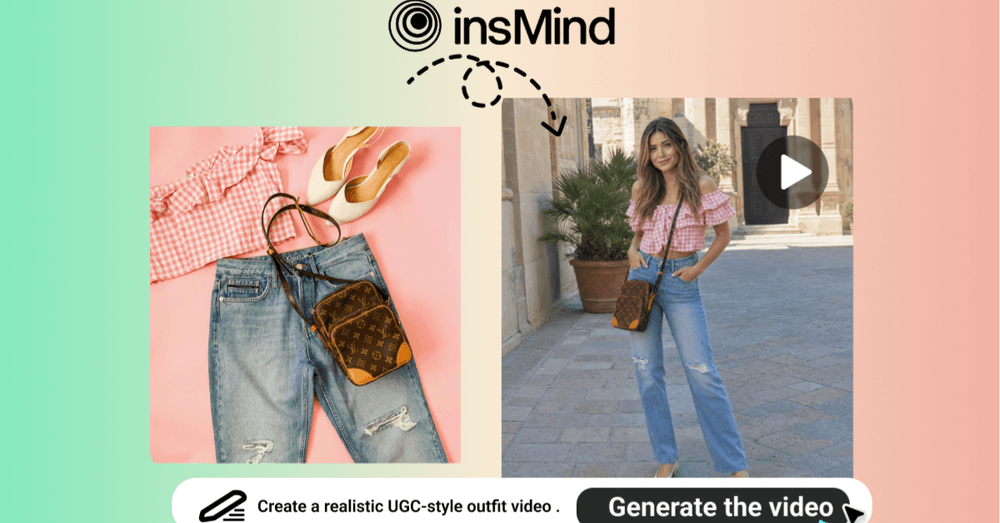
The product moment is especially important when you plan to generate video from a reference image. Your script should describe an action viewers can see: applying serum, packing a gym bag, styling an outfit, opening a product box, or holding an accessory in a natural setting.
Beauty UGC Script Templates
Beauty scripts need sensory details. Viewers want to imagine texture, finish, application, and visible payoff. Keep the language personal, but avoid making the ad sound too perfect.
Template 1: Problem-Solution Skincare
Hook: "My makeup kept clinging to dry patches until I changed one step." Problem: "I wanted a smoother base, but heavy creams made my T-zone look shiny." Product moment: show the serum or moisturizer being applied before sunscreen. Proof: "It absorbs quickly and leaves my skin looking calmer." CTA: "Try it before your next makeup routine."
Template 2: Get-Ready-With-Me Product Demo
Hook: "This is the product I grab when I have five minutes to get ready." Scene: a vanity, bathroom mirror, or morning-light setup. Product moment: hold or apply the product clearly. Benefit: glow, smooth finish, easy routine, or no complicated steps. CTA: invite viewers to save the routine.
Fitness UGC Script Templates
Fitness scripts should connect to a routine. Instead of saying a product is high quality, show where it fits: before training, during a home workout, after recovery, or inside a busy morning schedule.
Template 1: Routine Upgrade
Hook: "This made my morning workouts feel way less chaotic." Problem: "I used to waste time finding gear and getting set up." Product moment: show the product being carried, worn, opened, or used. Proof: "Now I can start faster and stay consistent." CTA: "Use this if your routine needs less friction."
Template 2: Honest First Impression
Hook: "I tested this for a week, and here is what surprised me." Scene: gym, home workout corner, walking path, or locker room. Product moment: use the item in a realistic movement. Benefit: grip, support, comfort, portability, or motivation. CTA: ask viewers if they would try it.
Ecommerce UGC Script Templates
Ecommerce UGC works when shoppers can picture the product in their own life. The script should answer one practical question: why should someone stop scrolling for this item?
Template 1: Product Discovery
Hook: "I saw this everywhere and finally understood the hype." Problem: "Most options looked good online but felt awkward in real life." Product moment: hold, wear, style, open, or place the product in a real setting. Proof: "It fits into my daily routine without extra effort." CTA: "Check this out before it sells out."
Template 2: Style the Product
Hook: "Here is one product, three ways I would use it this week." Scene: quick transitions between casual, work, and weekend settings. Product moment: keep the product visible and consistent. Benefit: versatility, convenience, style, or gifting value. CTA: "Which version would you use first?"
For ecommerce teams that want to turn product assets into short ads, an AI product video generator can help create more angles from the same product image.
How to Create AI UGC Videos with insMind?
Once your script has a clear hook and product moment, use insMind to turn it into a short UGC-style clip. The steps below keep the same workflow and image order as the source article.
Step 1: Upload Your Product Photo
Start with a clean product or lifestyle image. For beauty, use packaging or an application shot. For fitness, show the product in a workout context. For ecommerce, choose a product image with enough detail for AI to preserve shape, color, and style.
Step 2: Enter a UGC Prompt
Write a focused prompt that combines the script direction with the visual action. If you already have a script outline, a script-to-video AI workflow can help turn that idea into a clearer video prompt.
Step 3: Set Model, Duration, and Resolution
Choose model, duration, resolution, end frame, and audio settings based on the platform. Short clips are useful for hooks and product reveals, while longer clips work better for routine scenes or multi-beat demos.
Step 4: Generate and Download
Generate the clip, review the movement, and download the final version. You can use it as a TikTok ad concept, Instagram Reel, product-page visual, email creative, or storyboard for a creator brief.
Prompt Tips for Better AI UGC Scripts
The script and prompt should support each other. The script carries the message; the prompt gives visual direction. For example, if the script says the outfit is perfect for travel, the prompt should show travel movement, natural daylight, and a realistic setting.
- Use product-specific nouns instead of vague descriptions
- Mention camera style, lighting, and creator action
- Keep one main idea per prompt
- Match the platform format before exporting
When you need broader creative variations beyond UGC scenes, an AI video generator can help you test different formats from the same campaign concept.
FAQ
What is an AI UGC script?
It is a structured short-form ad script designed for creator-style content. It usually includes a hook, problem, product moment, proof, and CTA.
Can I use the same script for beauty, fitness, and ecommerce?
Use the same framework, but customize the language. Beauty needs texture and finish, fitness needs movement and routine, and ecommerce needs practical product context.
Can AI UGC videos be used for ads?
Yes. Always review platform rules and brand policies, but AI UGC videos can be useful for ad concepts, testing, and short-form creative production.
Turn UGC Scripts into Testable Videos
Fast creative teams do not wait for every script to feel perfect. They turn clear hooks into visual tests, compare what works, and scale the strongest angles. Start with one template from this guide, adapt the product moment, and make the prompt specific enough for a useful video result.

Author
Ahmar Naeem Khan
Helping SaaS Brands Scale Organically | High-Authority Link Building • Strategic Outreach • Revenue-Focused SEO