How to Always Respond to Emails Professionally

You know, one unprofessional email can cost you a client or even your reputation. And most people do not realize this until it is too late.
Email is still the backbone of professional communication. 86% of business users say email is their preferred channel for work communication. That means every email you send is a direct reflection of how you and your business are viewed.
But here is the problem. Most people never learn how to write professional emails. They write the way they text, like casually and unclearly. And that creates misunderstandings, delays, and a poor impression.
Poor communication costs US businesses around $2 trillion a year. A big part of that cost comes from poorly written emails.
Responding professionally is not complicated. You just need to follow the right practices consistently.
In this blog, we will look at practical ways to always respond to emails professionally. Continue reading to learn those ways.
What Does a Professional Email Response Look Like
A professional email is clear and straight to the point. It addresses the question directly. The readers get the idea from the start what the email is about and what the sender is going to say.
Look at this unprofessional response:

Now look at the professional version of the same message:

Both samples are replies to the same email and contain the same information. But one looks careless, and the other builds trust instantly.
A professional email starts with a proper greeting. It uses complete sentences. It has a clear message in the body. And it ends with a polite closing line. It does not have to be long. It just has to be respectful and easy to read.
How to Reply to an Email
Replying to an email professionally is not just about the words you use. It is about the whole process. Here is how to do it right.
Read the Email Fully Before Replying
One of the biggest mistakes most people make is not to read and understand the received email. People read a few lines of the mail and start writing the reply. They miss important details and the context of the email. When the recipient finds something missing, it makes a bad impression.
Read the complete email before you type a single word. Read it once to understand the main point. Then read it again to find any specific questions or requests written in the middle or at the end.
After that, make a quick note of everything the sender is asking in your head. Some emails have more than one question. If you miss one, the sender has to follow up. And that makes you look unprofessional.
It may take some extra time to read the mail with full attention to understand it. But it saves you from sending incomplete responses. Also, it shows the other person that you actually paid attention to what they said.
Start with a Proper Greeting
Professional emails start with a greeting. Without it, the emails look abrupt and generic. So, it's important to make the email personal to the reader.
Start with the recipient's name. It can be “HI John" or "Dear Ms. Sarah". But, if you do not know their name, you can simply say "Dear Sir/Madam".
But never start writing the mail without any greeting. It looks rude and careless.
Discuss the Context First
The first thing readers want to know is why you are writing them an email. If you do not add context at the very beginning, it may confuse the reader about the mail.
A simple context line at the start helps the reader understand the purpose of the mail. It makes the rest of the email easier to follow. For example, you can write:
"Following up on our recent discussion on X."
or
"Sharing an update on Y."
These lines tell the reader what the email is about. Without this, the reader feels confused from the start.
Match the Tone to the Situation
The selection of tone when writing a reply to an email is very important. Because not every email needs the same tone. And using irrelevant tones in any situation can create a bad impression.
If you need to email your colleagues on any project or discussion, you can use a friendly tone. Similarly, if you need to reply to a customer's complaint, the tone needs to be empathetic and formal.
You have to decide it first before starting to write the mail. So, read the situation and then choose a tone according to the requirements.
Handle Criticism with Patience
Whenever we receive a negative response from a customer or a colleague, our first instinct is always to write the reply and defend ourselves.
But doing this may be the worst thing you can do.
So when you receive a critical email, pause before responding. Take your time and relax. Then open the mail again and read it with a calm mind. Then write a reply according to the situation. A simple line can change the tense situation, like:
"I understand your concern, and I appreciate you bringing this to my attention."
Then tell the solutions if there are any. This way, you can turn angry customers into loyal ones.
Keep Your Responses Timely
A late reply is also an unprofessional reply. Even if the email is well-written, responding after many days is bad.
Therefore, check your inbox regularly. If you do not have the required information to reply to an email at that time, you can reply with a quick note. For example, you can write
Received your email. I will get back to you tomorrow.
People usually expect a reply to their email within 24 hours. Try to stay within that window. And if something is urgent, reply even sooner.
End with a Clear Closing Line
Most people finish writing the main message and hit send without a proper closing. And that makes the email feel incomplete and abrupt.
A clear closing line wraps up the email nicely. Something like "Please let me know if you have any questions" works well in most situations.
Then end with a sign-off. "Best regards," followed by your name, is the standard way to close a professional email.
Proofread Before Sending
We all make typos and grammatical mistakes when writing quickly. And sending an email with errors in it makes you look careless and unprofessional.
So read your email once from top to bottom. Check for spelling mistakes, missing words, and sentences that do not make sense. Also, make sure you have addressed everything the sender asked.
How to Generate a Professional Email Reply Quickly?
You can quickly generate a professional email reply using an AI email writer tool.
We have discussed earlier all the important points for responding to an email professionally. But manually following all the steps is a time-consuming task. Also, you need to be very careful so that you do not miss any important point or detail to add in the response.
But generating a professional reply is quite easy with the help of an email writer. There are plenty of such tools out there. You can choose any that best meets your requirements. We tried iLoveNote and found it helpful for writing clear email replies quickly. We’ll use it here to give you a practical example of how you can generate an email response quickly.
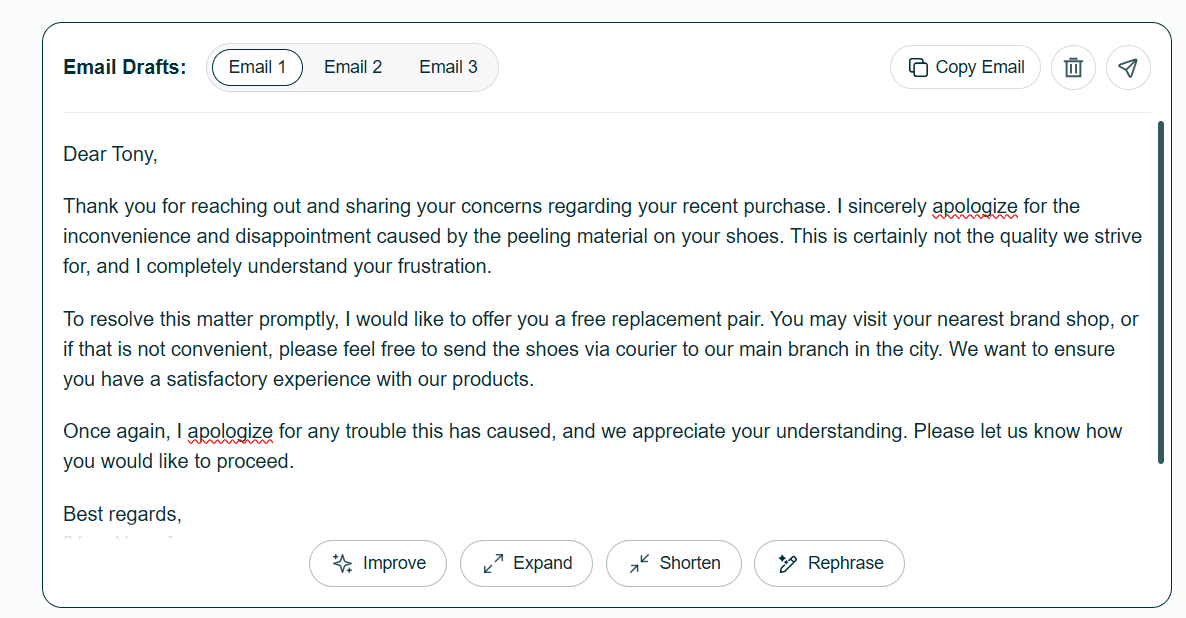
Go to the tool and paste the email you received in the “Received Email” box. Then write the important points you want to add to your response. After that, select the type and tone from the provided options and hit the “Generate Email” button.
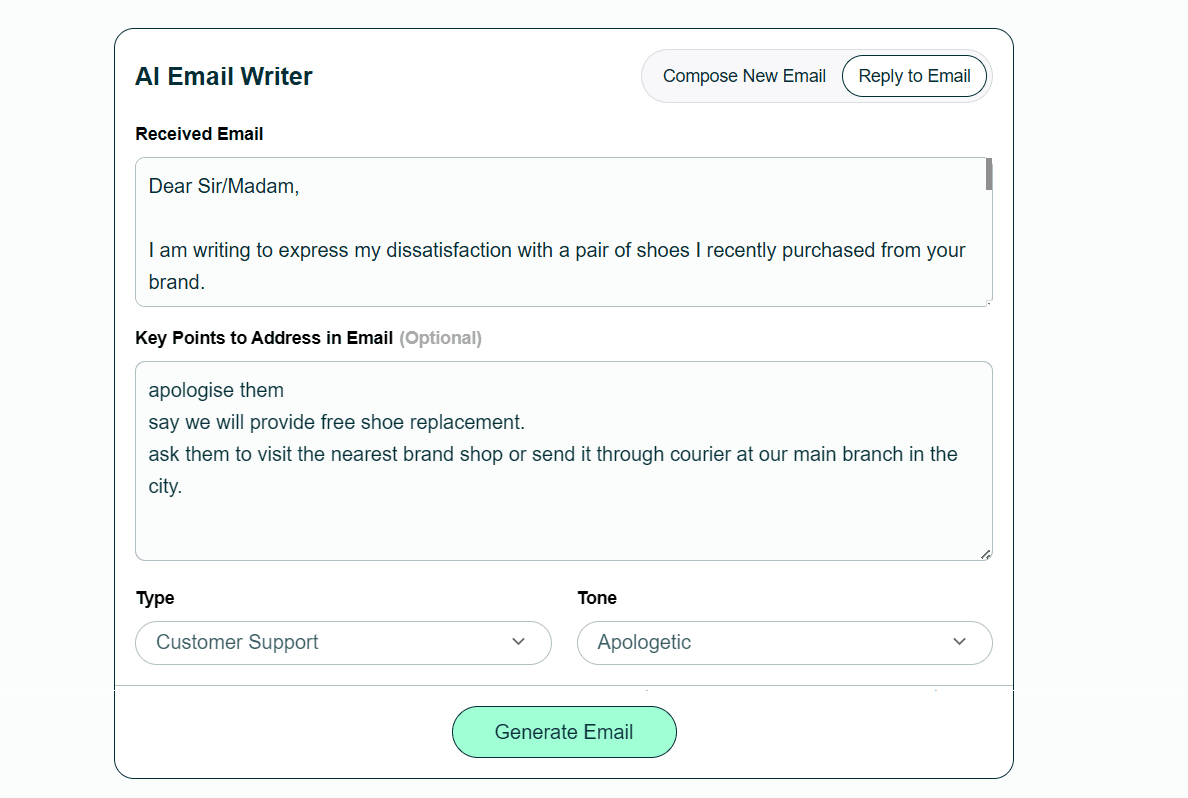
The tool will generate a professional email response with all the necessary details. You can customize the response and use it. Here is a sample response generated by the Editpad:
Final Words
Writing professional emails is not a difficult skill. You just need to follow the right practices every time you hit reply.
Follow the points discussed earlier when you write responses. These small habits make a big difference in how people see you professionally. And in the long run, they help you build stronger relationships with clients and colleagues.
So next time you receive an email, take a moment before replying. A thoughtful response always wins.

Author
Byline Text
M. Azam is a seasoned digital marketing writer with a strong focus on B2B and SaaS industries. He excels in SEO, SEM, AEO, and content marketing and is proficient in Google Analytics.