Guest post7 min read31 Aug 2026

How to Build a Digital Brain: A Step-by-Step Guide to Organizing Your Chaos

How to Build a Digital Brain

We generate more personal data today than ever before. Notes live on our phones, bookmarks pile up in browsers, and important documents disappear among dozens of desktop files. Finding one specific piece of information can feel like hunting for treasure.

I struggled with digital clutter for years. I tried productivity systems, folder structures, and different note-taking apps, but most required constant manual maintenance. Eventually, I realized the problem was not my work ethic. It was the outdated system I was using.

What I needed was a smarter approach to knowledge management. An AI Wiki can turn scattered information into a searchable knowledge system that understands context rather than simply storing files.

This guide explains how I built my own digital brain and how Wikis AI can help transform digital chaos into an organized, intelligent workspace.

The Crisis of Scattered Information

Human memory is not designed to store and retrieve unlimited amounts of information. We are better at processing ideas, recognizing patterns, and making connections than remembering exactly where we saved a particular document.

According to IDC research, data professionals can spend a significant portion of their working time searching for information. The result is wasted productivity, unnecessary frustration, and mental fatigue.

Why Folders Are Failing Us

Traditional folders force every idea into a specific category. But real-world information rarely works that way.

Imagine saving an article about “marketing software.” Should it go into your marketing folder or your software folder? You have to make a decision, and later you have to remember that decision to find the article.

The more information you collect, the harder this becomes.

The Shift to Smart Systems

A better knowledge system should work more like the human brain. Instead of relying entirely on rigid categories, it should recognize relationships between ideas.

This is where machine learning and conversational search become valuable. Rather than manually organizing every note, you can allow an AI Wiki to analyze your information, understand its context, and help you retrieve knowledge through natural-language questions.

That was the idea that led me to explore Wikis AI.

Preparation: What You Need Before Starting

You cannot build a useful digital brain on top of a completely chaotic foundation. Before moving your information into a new system, spend a little time preparing your existing data.

Gather Your Digital Clutter

Start by locating your current sources of information. Collect notes, PDFs, text files, web clippings, meeting records, and other useful documents.

Put copies of them into one temporary location. Do not waste hours organizing them into folders at this stage. The objective is simply to make sure important information does not get left behind.

Define Your End Goal

Next, determine what you actually want your digital brain to accomplish.

Are you building a research library? Managing work meetings? Creating a knowledge base for content production? Organizing information for a long-term project?

Your goal determines what information deserves to stay. Delete obvious junk and outdated material before importing everything into your new system.

Step-by-Step: Setting Up Your Smart Workspace

Once your data is gathered, you can begin building the actual system. I tested different approaches and found that the most useful workflow focused on retrieval rather than complicated formatting.

For this process, I use Wikis AI.

Step 1: Choose the Right Engine

The first requirement for an effective AI Wiki is intelligent search. A knowledge base is only useful if you can quickly retrieve the information inside it.

Wikis AI is designed around conversational retrieval, allowing you to interact with your stored knowledge more naturally. Instead of navigating through layers of menus, you can approach your information with questions.

This makes the platform feel less like a digital filing cabinet and more like an intelligent workspace.

Step 2: Dump and Index Your Data

Now comes the satisfying part: importing your information.

Upload your notes and documents, or add relevant text and links. Resist the temptation to manually create dozens of categories before you begin.

Let the system process the raw information. An AI-powered knowledge system can analyze the context of your content and make it easier to retrieve later.

The important shift is that your job is no longer to predict every future category. Your job is to provide useful information and let the system help organize the relationships between it.

Step 3: Master the Search Prompt

Your daily workflow should change once your information is indexed.

Instead of clicking through folders, use the search interface like a conversation. Ask specific questions about the information you have stored.

For example:

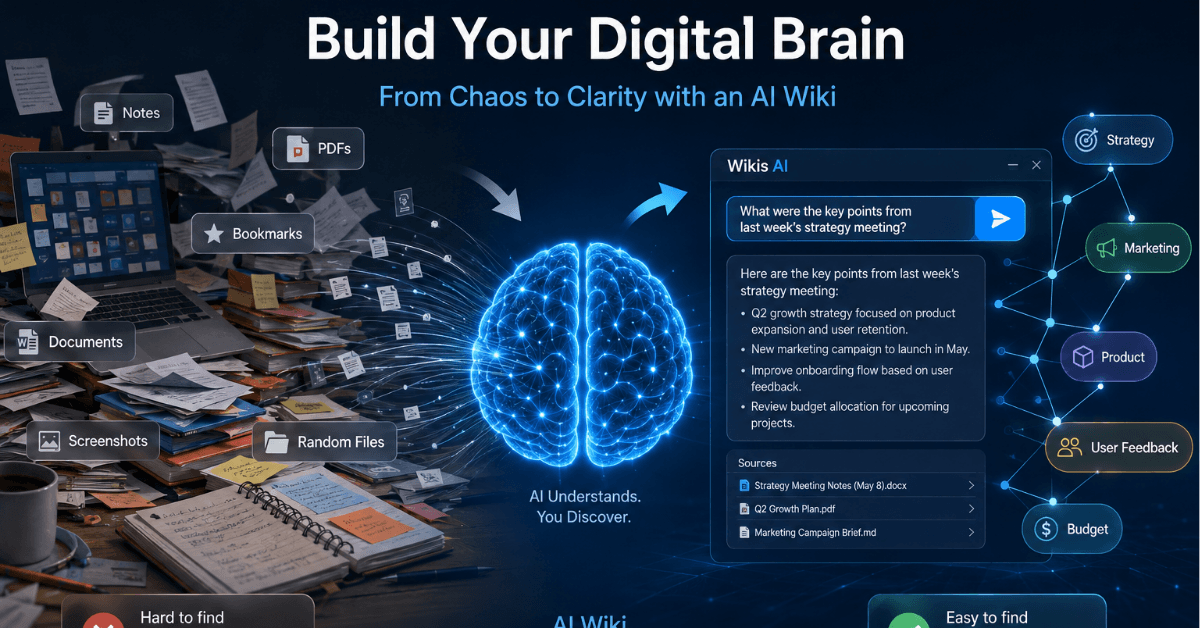
“What were the key points from last week’s strategy meeting?”

A conventional search tool might return a document name. An AI Wiki can go further by interpreting the content and producing a useful summary.

The quality of your questions matters. Specific questions generally produce more useful answers, so think about what you actually want to know rather than simply searching for keywords.

Best Practices for Long-Term Success

Building an AI-powered knowledge base is only the beginning. A few habits will help keep your digital brain useful over time.

Keep Inputs Clean and Contextual

Garbage in can lead to poor results. When saving a new note, add a short sentence explaining why the information matters.

Instead of saving a raw URL, write something like: “This article explains recent SEO trends and may be useful for future content research.”

That small amount of context can make your knowledge base easier to understand and retrieve later.

Link Ideas, Not Just Files

Do not think of your AI Wiki as a storage box. Think of it as a network of ideas.

When an AI-generated answer reveals a related concept, explore it. Follow connections between documents, topics, projects, and previous research.

This can turn note-taking into a creative process. Instead of simply collecting information, you can use your knowledge base to discover relationships and generate new ideas.

Review and Refine Weekly

Even an intelligent knowledge system needs occasional maintenance.

Spend ten minutes each week reviewing your newest information. Remove outdated or irrelevant material and correct important notes when necessary.

A smaller, high-quality knowledge base can be more useful than an enormous collection filled with outdated information.

Common Pitfalls to Avoid

My experience with AI-powered knowledge management has been positive, but there are still mistakes worth avoiding.

The Over-Tagging Trap

One of my first mistakes was trying to manually tag everything.

This quickly defeated the purpose of automation. If you spend more time maintaining your knowledge structure than using it, the system becomes another productivity burden.

Use automation where possible. Focus on providing good information rather than micromanaging every category.

Blind Trust in Algorithms

An AI Wiki can be powerful, but it is not infallible.

AI systems can misunderstand ambiguous questions, misinterpret context, or combine information incorrectly. This is especially important when working with financial figures, research findings, business statistics, or other critical information.

Always verify important claims against the original source before using them professionally.

The Takeaway: Working Smarter, Not Harder

Moving away from traditional folders can feel uncomfortable at first. We are accustomed to organizing digital information into familiar hierarchies, even when those structures become difficult to maintain.

But conversational knowledge retrieval represents a more flexible approach. Instead of asking, “Where did I save this?” you can ask, “What do I know about this?”

That is the real promise of an AI Wiki.

With Wikis AI, you can move toward a workflow where information is searchable through natural language, relationships between ideas become easier to discover, and less time is spent manually maintaining folders.

Building your personal digital brain takes some initial effort. But once the system is working, it can feel like having a second brain for your digital life.

The goal is not to collect everything. The goal is to make the information you already have easier to understand, connect, and use. Start small, keep your inputs meaningful, and let AI handle more of the organization. Your digital chaos may be far more manageable than you think.

Emilia

Author

Emilia

Emilia is a passionate writer and content creator with an interest in technology, digital trends, and online business. She enjoys researching new topics and turning complex ideas into clear, engaging, and useful content for readers.


Share post

Similar posts