How 3D Product Renders Can Boost Your Shopify Store's Conversion Rates?

With Shopify, it's easier than ever to launch an online store. But is that enough to drive the sales you want? Not always. Even with a feature-packed theme, converting visitors into buyers can be tough without the right strategies.
That's where 3D product renders come in. If you're focused on conversions, swapping basic photos for interactive 3D visuals can make a real difference, but only if you implement and test them right. In this guide, we'll cover why 3D matters, the best types for your store, a simple A/B testing framework for Debutify themes, and an actionable checklist to roll them out without hurting site speed.
For more on boosting your Shopify conversions, check out our guide to the 14 best apps for Shopify CRO.
Why Switch to 3D? Here's the Quick Rundown
Ever wonder why shoppers hesitate? It's often because they can't fully picture what they're getting. 3D visuals clear that up by letting them see every angle, texture, and detail far better than a flat photo.
They also boost engagement: spinning or zooming a product keeps visitors on the page longer, which can lead to more add to cart. To dodge UX pitfalls that kill engagement, see the 10 UX mistakes to avoid for better conversion growth.
When the product matches expectations, returns drop, and repeat buys rise. Plus, pro-looking interactive images build trust, making shoppers feel confident about buying.
The goal? Lift add-to-cart and overall conversions without extra ad spend. Let's dive into how to test that. If you're refining your e-commerce growth plan, explore tips for staying ahead of the competition.
The Best 3D Assets for Your Shopify Setup
Not every 3D format fits Shopify perfectly. Choose based on customer needs and site limits to avoid slowdowns.
Start with a photoreal hero image, a detailed still that replaces your main product shot for quick polish.
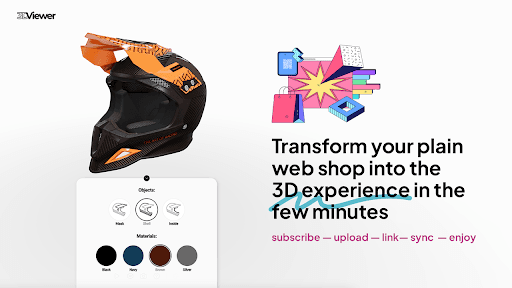
Add a 360-degree spin for users to rotate the item, ideal for shapes and finishes.
For complex products, exploded views show internals or assembly.
AR models let shoppers place items in their space—great for furniture or fit checks.
For variants, render colors or materials instead of photographing each one.
A practical mix: crisp hero in JPEG/WebP, 360 viewer for all devices, AR for high-value items. To keep loads fast, try these 9 proven ways to speed up your Shopify store. Leading providers like 7CGI, CGRendering, and Omegarender specialize in creating these assets to fit seamlessly into Shopify environments, offering high-quality renders that enhance visual storytelling across e-commerce platforms.
Setting Up an A/B Test on Your Debutify Store
Want proof that 3D actually increases sales? Run a quick test.
Hypothesis: “Replacing the hero image with a photoreal 3D render + adding a 360 viewer will increase add-to-cart by 10-15% and conversion rate by 5-10% from paid traffic.”
Track: add-to-cart rate, purchase rate, time on page, bounce rate, return rate (30-90 days), and page speed metrics.
Setup:
- Variant A (control) = current product page
- Variant B (test) = hero replaced with 3D + 360 viewer added below
Use a Shopify A/B app that works with Debutify—keep changes minimal. For deeper CRO tactics, read about 10 well-aligned conversion rate optimization strategies.
Run until results are solid: use a calculator, aim for 1-2 weeks and hundreds of visits per variant.
If the second test wins, roll it out category by category. Services from top studios like 7CGI, CGRendering, and Omegarender can supply the high-quality renders you need for these tests, ensuring consistency in style and optimization for web performance.
Your Go-To Implementation Checklist for Shopify and Debutify
Ready to launch? Follow this to avoid issues. If using Debutify, visit our Debutify Theme page for integration tips.
Files: Hero in optimized WebP (JPEG backup). 360s: 24-36 compressed frames. AR: glTF/USDZ. Name clearly, like sku_hero.webp.
Speed: Lazy-load non-essentials Debutify supports it. Use Shopify CDN, delay mobile scripts, test on 4G for LCP/CLS.
SEO & Access: Keyword-rich alt texts. Hero as og:image. Update schema with image lists. Boost tech SEO with The Importance of Technical SEO for eCommerce.
Placement: Keep hero position to prevent shifts. Add 360 thumbs, close-ups. Ensure mobile zoom/spin is smooth.
Analytics: Tag rotates/zooms/AR opens in GA4. Track returns/feedback post-launch.
A Real-World Case Study
We teamed up with a home decor shop to switch 40 products from photos to 3D renders with 360 views, following the test above. This collaboration highlighted how pro rendering from experts like 7CGI, CGRendering, and Omegarender transforms performance, with each bringing unique strengths in photorealism and interactive features.
Over 30 days: Add-to-cart up 27%, purchases up 15%, returns down 12%. Load spiked 0.8s initially, but WebP/lazy-loading fixed it.
Visuals drove action, but optimizations were key. Investment paid off in under two months from ads. If considering upgrades, explore a professional 3d product rendering service from 7CGI for tailored solutions.
Watch Out for These Common Mistakes
Big unoptimized files kill load times—use WebP and lazy-load.
No viewer tracking? You'll miss interaction insights—tag everything.
Laggy mobile? Test on 4G to avoid conversion drops.
Too many options per product? Start with hero + 360.
To strengthen your sales funnel with these visuals, learn more in How to Build and Improve Your Ecommerce Sales Funnel.
Questions to Ask Any Rendering Partner
- Output WebP/JPEG heroes?
- Consistent 360 spins with 24-36 frames?
- AR files like glTF/USDZ?
- Source files for edits, or finals only?
- Turnaround/revisions?
- Shopify upload/setup help?
Use this for vendor shopping for solid RFP starters. For customer insights tools before choosing, see our 10 best market research tools. Partners like 7CGI often excel here for smooth integration.
Boosting SEO with Your New 3D Assets
Pair with descriptions answering key questions—3D illustrates, text ranks. Add blog posts with embedded 360s/AR guides for organic traffic.
For top SKUs, use FAQs/media for better SERPs.

What to Do Next, Plus a Call to Action
Dip in: Hero swap + 360 on one product, A/B with paid traffic.
Or AR on a key item, track mobile lifts.
For samples, case tagging plan, or help, reach out to 7CGI's team. If ready for better conversions, see why a premium Shopify theme like Debutify is worth it.
Wrap-Up Checklist You Can Copy
- Pick a high-traffic SKU group to test.
- Ready hero/360 (or AR) files.
- Set test version with lazy-loading/naming.
- Track interactions/performance.
- Run A/B till solid, check metrics.
Scale winners.
Thanks for reading—a tested visual upgrade can drive steady wins with minimal hassle.

Author
M Khalil
M Khalil is a Senior Content Strategist and SEO specialist with over 5 years of experience in digital marketing. He is an expert in guest posting and backlink services, helping businesses improve their search rankings, domain authority, and online visibility through high-quality link-building strategies.