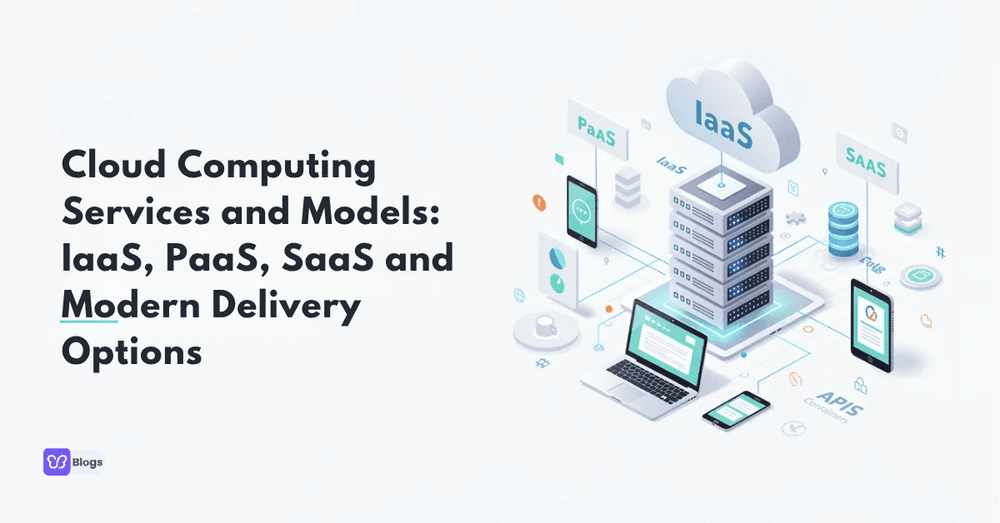
Cloud Computing Services and Models: IaaS, PaaS, SaaS and Modern Delivery Options

Introduction to Cloud Computing Services and Models
Cloud computing services and models define how organizations access servers, networking, data storage, and computing power over the internet on demand. Whether you are an IT leader evaluating migration strategies, a developer building web applications, or a business owner looking to cut upfront costs, understanding cloud computing services and models is no longer optional. The global cloud services market hit approximately $675.4 billion in 2024, growing over 20% year-over-year, and that trajectory shows no signs of slowing through 2026.
Cloud computing services are divided into Service Models and Deployment Models. This article answers the questions "what are service models of cloud computing" and "what is IaaS PaaS and SaaS", while clarifying the difference between SaaS and PaaS and IaaS. Here are the main cloud service models you need to know:
- IaaS (Infrastructure as a Service) - Rent virtualized computing resources like virtual machines and storage.
- PaaS (Platform as a Service) - Build and deploy applications on managed platforms without worrying about underlying infrastructure.
- SaaS (Software as a Service) - Use fully managed software applications via browser or mobile app.
- FaaS / Serverless - Run event-driven code functions with zero server management.
- CaaS, BaaS, and XaaS - Specialized "as a service" options for containers, backends, and beyond.
The three main cloud service models - IaaS, PaaS, and SaaS - form the cloud computing stack that most organizations rely on today. Let's break each one down.
Core Models of Cloud Computing: IaaS, PaaS, SaaS
A model of cloud computing describes which layers of the technology stack the cloud provider manages versus which layers remain your responsibility. The higher the abstraction, the less you manage and the more the service provider handles on your behalf.
Service Models include IaaS, PaaS, and SaaS. These three classic cloud computing paas iaas saas layers form the foundation of virtually all cloud services today. Each cloud computing model represents a different balance between control and convenience, and together they constitute the primary cloud computing delivery models used across industries. Think of them as a computing model spectrum: IaaS gives you the most control, SaaS gives you the least complexity, and PaaS sits right in the middle.
Here is how the three cloud service models stack up at a glance:
- IaaS - You manage operating systems, apps, and data. Provider manages physical hardware and virtualization.
- PaaS - You manage application code and data. Provider manages OS, runtime, middleware, and infrastructure.
- SaaS - You configure and use the application. Provider manages everything else.
Infrastructure as a Service (IaaS)
IaaS is the lowest-level cloud service model. It delivers virtual machines, networks, and data storage as rentable, virtualized infrastructure over the internet. IaaS provides virtualized computing resources over the internet, letting businesses provision and decommission virtual servers in minutes instead of weeks.
Typical IaaS components include:
- Virtual servers (instances with configurable CPU, RAM, and storage)
- Block storage (VM disks) and object storage (like buckets for unstructured data)
- Virtual networks, subnets, firewalls, and load balancers
- Dedicated interconnects or hardware accelerators such as GPUs
In the IaaS model, customers manage operating systems, middleware, runtime environments, applications, and data. The cloud service provider manages physical hardware, hypervisors, and the physical infrastructure of the data center. IaaS offers the highest level of control over IT infrastructure among the three cloud service models.
Concrete examples of IaaS platforms:
- AWS EC2 - Launched in 2006 and still the benchmark for cloud computing technology in the IaaS space.
- Google Compute Engine - Announced in 2012 on Google Cloud, providing scalable virtual machines.
- Microsoft Azure Virtual Machines - Generally available since 2010 as part of the Azure cloud ecosystem.
Common IaaS use cases include lift-and-shift migrations, bursty e-commerce workloads, testing environments, high-performance computing, and disaster recovery. IaaS also underpins hybrid cloud and multicloud strategies by extending on-premises data centers into public cloud environments.
Pros:
- Granular control over infrastructure and software stacks
- IaaS allows businesses to scale resources as needed
- IaaS typically uses a pay-as-you-go pricing model
- IaaS eliminates the need for on-premises data centers
Cons:
- IaaS requires technical expertise for management and maintenance
- Greater security responsibility (OS patching, hardening)
- Risk of over-provisioning or misconfiguration without strong cloud skills
Platform as a Service (PaaS)
PaaS provides a complete cloud platform for application development, build, test, and deployment. It bundles managed operating systems, middleware, and runtime environments so teams can focus on writing code rather than managing infrastructure. PaaS simplifies application development by managing infrastructure, allowing developers to focus on coding rather than infrastructure management.
PaaS supports continuous integration and continuous deployment (CI/CD) practices out of the box, and provides built-in tools for application deployment and management. It can also simplify application replatforming and refactoring processes when migrating legacy systems to the cloud.
Notable PaaS platforms include:
- Google App Engine - First public preview in April 2008, one of the earliest PaaS offerings.
- AWS Elastic Beanstalk - Introduced in January 2011, supporting multiple language runtimes.
- Azure App Service - Microsoft's managed PaaS, matured around 2015, supporting .NET, Java, Python, Node.js, and more.
Typical PaaS features include integrated CI/CD pipelines, auto-scaling, logging and monitoring, managed databases, and development tools for rapid application development. Common scenarios where PaaS excels include rapid prototyping, API backends, mobile and web app backends, and microservices architectures.
Advantages:
- Faster time-to-market for software applications
- Reduced ops overhead and server management burden
- Standardized environments reduce "works on my machine" problems
Downsides:
- Less infrastructure control (cannot always choose OS version or instance types)
- Potential vendor lock in with provider-specific APIs and configurations
- Compatibility limits with certain libraries or custom configurations
PaaS often sits on top of IaaS. A cloud provider manages the virtualized infrastructure beneath the platform layer, illustrating how cloud computing models are layered rather than isolated.
Software as a Service (SaaS)
SaaS is a cloud computing delivery approach where complete software applications are delivered via browser or mobile app. SaaS applications are accessed via web browsers or mobile apps, with no local installation required. SaaS delivers software applications over the internet without local installation, making it the most abstract and fully managed cloud service model.
The cloud provider manages everything on the backend: physical servers, platform, updates, security, and data storage. SaaS providers handle application maintenance and updates, which means users always run the latest version. SaaS is the most widely used public cloud computing service across organizations of all sizes.
Concrete examples with launch context:
- Salesforce CRM - Operating as a cloud-native SaaS since 1999, pioneering the model.
- Google Workspace (formerly G Suite) - Productivity tools and collaboration tools launched mid-2000s.
- Microsoft 365 - Officially launched in 2011, now one of the largest SaaS platforms.
- Slack - Launched publicly in August 2013, transforming workplace communication.
- Zoom - A more recent entrant that scaled massively during remote work adoption.
The average organization manages 305 SaaS applications, spanning CRM, ERP, HR systems, collaboration suites, project management, marketing automation, and analytics dashboards. SaaS applications are typically licensed on a subscription basis, and 72% of SaaS providers use hybrid pricing models that combine per-seat, per-feature, or usage-based tiers.
Pros:
- No installation, predictable subscription pricing, quick onboarding
- Continuous updates and patches handled by saas providers
- Minimal IT overhead and cost savings for non-technical teams
Cons:
- Limited customization compared to PaaS or IaaS
- Data residency concerns and data management complexity
- Dependence on internet connection and provider SLAs
SaaS is ideal for business teams that want outcomes - like closing deals in a CRM or running payroll - rather than worrying about backend infrastructure or maintaining physical hardware.
Understanding the Difference Between IaaS, PaaS, and SaaS
Many people search specifically for the difference between SaaS and PaaS, and for good reason. Cloud service models differ based on control, flexibility, and management responsibilities. Cloud computing models dictate the level of management the user retains at each layer.
Here is how the responsibility stack works, from the bottom up:
- Physical hardware → Virtualization → Operating systems → Middleware → Runtime → Application → Data → User interface
- In IaaS, the customer manages everything from the OS upward.
- In PaaS, the customer manages the application and its data.
- In SaaS, the customer manages usage, permissions, and configurations only.
Consider deploying a web application. On IaaS, you provision virtual servers, install the OS, configure a web server, set up your runtime, and deploy your code. On PaaS, you push your code and set environment variables - the provider manages scaling, load balancing, and runtime. With SaaS, you subscribe to a platform like Salesforce, configure it, and start using it. No backend work required.
- Cloud computing paas iaas saas represents these three distinct abstraction levels that, combined, cover the vast majority of cloud workloads today.
When choosing between these types of cloud computing, consider:
- IaaS if your team has strong DevOps skills and needs full control over the stack.
- PaaS if speed of delivery matters more than infrastructure control, and you want to deploy web applications quickly.
- SaaS if the function is standard (email, CRM, HR) and customization needs are minimal.
Practical Responsibility and Control Breakdown
Here is what each layer looks like in practice:
- IaaS responsibility: You patch Linux or Windows on your VM, install security updates, configure firewalls, manage backups. The cloud provider manages underlying hardware and the hypervisor.
- PaaS responsibility: Azure App Service handles OS updates and runtime patches automatically. You deploy applications and manage your code and data.
- SaaS responsibility: Your CRM updates itself overnight. You manage user access, permissions, and data content.
Security and compliance responsibilities follow the same pattern. Major providers publish shared responsibility models that spell out exactly who handles what in each cloud computing model. As you move from IaaS toward SaaS, costs shift from CapEx (building and maintaining traditional it infrastructure and data center hardware) to OpEx (subscription fees). This shift lets organizations optimize costs while reducing the burden of maintaining physical hardware.
Cloud Deployment Models: Public, Private, and Hybrid Cloud
Cloud deployment models are distinct from service models. While iaas paas and saas describe what level of abstraction you consume, deployment models describe where and how cloud resources are hosted and accessed.
The three primary deployments are public cloud, private cloud, and hybrid cloud, with multicloud increasingly common. Organizations blend deployment and cloud computing delivery models to meet regulatory, performance, and cost objectives. The same IaaS, PaaS, and SaaS concepts can run across on-premises, edge, and public cloud platforms.
Public Cloud
Public Cloud services are owned and operated by third-party providers like AWS, Microsoft Azure, and Google Cloud. Customers share physical resources in multi-tenant environments but maintain logical isolation through virtual networks and access controls.
Benefits of public cloud include:
- Global regions and availability zones for low-latency access
- Elastic scaling - scale resources up or down within minutes
- Broad catalogs of managed cloud services and computing resources
- Pay-per-use pricing that eliminates large upfront costs
Common adoption scenarios include startups building greenfield apps, organizations migrating workloads from on-premises physical infrastructure, and handling seasonal or spiky workloads. Public cloud is the default backdrop for most discussions of cloud computing services today.
Private Cloud
Private Cloud offers higher security and control for a single organization. The infrastructure is dedicated, either on-premises or hosted by a provider, and runs on technologies like VMware, OpenStack, or proprietary stacks to deliver cloud-like automation and self-service.
Advantages include maximum control, strong customization, and easier compliance with strict regulations or data residency requirements. Trade-offs are significant: higher upfront and operational costs, hardware lifecycle management, and capacity planning obligations.
Private cloud is a core part of the broader computing model strategy for heavily regulated industries like banking and healthcare, where data sovereignty laws and compliance frameworks limit what can run on shared infrastructure.
Hybrid Cloud and Multicloud
Hybrid Cloud combines public and private clouds for greater flexibility. It joins on-premises or private cloud resources with one or more public clouds through secure networking and consistent management tooling.
Common hybrid patterns include:
- Bursting to public cloud for peak loads while keeping steady-state workloads on-premises
- Keeping sensitive data in private cloud environments while running analytics in public cloud
- Using cloud platforms for backup and disaster recovery
By 2025–2026, most large enterprises operate in hybrid cloud environments and multicloud setups for resilience and to avoid vendor lock in. Approximately 89% of organizations report multicloud adoption, and 73% run hybrid cloud architectures. The distinction: a hybrid cloud approach focuses on combining different environment types, while multicloud focuses on using multiple public cloud providers.
These deployment strategies directly affect how organizations consume IaaS, PaaS, and SaaS across their cloud ecosystem.

Extended and Emerging Cloud Service Models
Beyond the core trio of iaas paas saas, additional cloud service models address more specialized problems. These include serverless computing and FaaS, BaaS, CaaS, and various XaaS offerings. They sit on top of or alongside IaaS, PaaS, and SaaS, further abstracting infrastructure and targeting modern application development patterns like microservices and event-driven systems.
Cloud computing continues to evolve, and these newer cloud services represent the next layer of the cloud computing stack.
Serverless Computing / Function as a Service (FaaS)
FaaS is an event-driven model of cloud computing where small code functions run in response to triggers with no server management required. The cloud provider manages all underlying infrastructure, scaling, and availability.
Key examples:
- AWS Lambda - Launched in 2014, pioneering serverless computing.
- Azure Functions - Released in 2016.
- Google Cloud Functions - Available since 2017.
Pricing is based on invocation count and execution time, making FaaS cost-effective for intermittent workloads. Use cases include image processing on upload, real-time log processing, lightweight APIs, and IoT event handling.
FaaS extends the PaaS idea further up the abstraction ladder. The serverless computing market is projected to grow from $21.9 billion in 2024 to $44.7 billion by 2029, reflecting strong cloud adoption of this model.
Containers as a Service (CaaS) and Backend as a Service (BaaS)
CaaS is a managed container orchestration cloud service model, typically built on Kubernetes or similar platforms. It provides more control than pure PaaS or FaaS but abstracts away the complexity of managing container infrastructure directly.
Popular CaaS offerings include:
- Amazon EKS - Managed Kubernetes on AWS
- Google Kubernetes Engine (GKE) - Kubernetes-native on Google Cloud
- Azure Kubernetes Service (AKS) - Microsoft's managed Kubernetes
BaaS delivers prebuilt backend capabilities - authentication, real-time sync, push notifications, and data storage - heavily used in mobile and web app development. Firebase (acquired by Google in 2014) and AWS Amplify are leading BaaS platforms.
CaaS and BaaS complement existing cloud computing models, giving developers more choices for deployment, architecture, and how they deliver cloud computing services to end users.
Real-World Use Cases and Industry Scenarios
Organizations rarely use a single model in isolation. Instead, they mix cloud computing services and models to support real workloads across departments and business units.
Here are sector-specific scenarios:
- E-commerce: Public cloud IaaS for scalable compute during sales spikes, SaaS for CRM and checkout, FaaS for order processing and inventory events.
- Finance: Hybrid cloud with private cloud for core transaction systems, PaaS for customer-facing mobile backends, SaaS for collaboration tools and HR.
- Healthcare: Private or hybrid deployment for patient data compliance, SaaS for administrative productivity tools, PaaS or IaaS for research analytics.
- SaaS startups: Built entirely on PaaS and FaaS stacks, leveraging managed databases and cloud resources to minimize infrastructure management overhead.
Data storage strategies (block, file, object) and development tools choices shape these architectural decisions. Hyperscalers like Google Cloud, AWS, and Azure provide the building blocks to assemble end-to-end solutions across deployment and service models.
Example Architectures Combining Multiple Models
Consider a financial services company running a hybrid solution:
- Core transaction systems remain on-premises in a private cloud for regulatory compliance.
- Analytics dashboards and reporting run on public cloud SaaS applications.
- A dev team uses IaaS for specialized GPU workloads (fraud detection models), PaaS for main API backends, and FaaS for background jobs like notification processing.
- Azure App Service (PaaS) integrates with Azure Functions (FaaS) and managed databases to accelerate application development.
- Data flows between on-prem databases and cloud services through VPNs or dedicated links in a hybrid cloud deployment, maintaining security while enabling cloud-scale analytics.
Each cloud service model plays a specific role in the architecture, and the combination delivers computing power that no single model could provide alone.

How to Choose the Right Cloud Computing Model for Your Organization
Choosing the right types of cloud model comes down to a handful of key decision criteria:
- Control vs. convenience - Do you need to configure every layer, or do you want the provider manages infrastructure end-to-end?
- Regulatory obligations - Data residency, compliance frameworks, and security risks may dictate private or hybrid cloud environments.
- Existing skills - A team without deep DevOps or cloud skills may struggle with IaaS but thrive with PaaS or SaaS.
- Cost structure - Evaluate total cost of ownership, not just sticker price. Factor in people costs, not just cloud bills.
- Time-to-market - SaaS and PaaS drastically reduce deployment timelines versus IaaS.
If you are asking "what are service models of cloud computing and which should I pick first?" - start with SaaS for non-differentiating workloads (email, HR, CRM). Then introduce PaaS for custom application development where speed matters. Reserve IaaS for workloads that demand full control or specialized underlying hardware.
Evaluate TCO, lock-in risk, SLAs, data residency, and integration with existing on-prem tools. Mixed cloud computing models and cloud deployment models - public, private, hybrid cloud - are normal and often the optimal path forward.
Checklist and Best Practices
Use this checklist when evaluating any cloud computing model:
- Security: Audit shared responsibility boundaries. Who patches what? Who controls encryption keys?
- Compliance: Verify data residency, industry regulations, and audit trail requirements for each model.
- Performance: Test latency, throughput, and compute needs. Match workloads to appropriate cloud platforms.
- Observability: Ensure logging, monitoring, and alerting work across all cloud environments.
- Disaster recovery: Plan backup and failover strategies that span deployment models.
- Cost governance: Implement FinOps practices to optimize costs and prevent bill surprises.
Map your workloads deliberately:
- Commodity functions (email, collaboration) → SaaS
- Differentiating services (custom APIs, core products) → PaaS or IaaS
- Event-driven, intermittent pieces (image processing, webhooks) → FaaS
Involve stakeholders from security, finance, and engineering when selecting cloud computing delivery models. The best architectures emerge from cross-functional decisions, not siloed choices.
A clear understanding of cloud computing services and models helps you design resilient, scalable, and cost-effective architectures for the long term. Cloud computing is not a one-size-fits-all decision. The organizations that get cloud right are the ones that match each workload to the service model and deployment model where it performs best - then revisit those decisions as their needs evolve.
Start by auditing your current workloads against the three cloud service models, identify gaps in your cloud skills, and build a roadmap that balances control, cost, and speed. The cloud ecosystem rewards intentional choices, not defaults.
Author
Debutify
Debutify is the easiest way to launch and scale your eCommerce brand.